Automatically Deploy a Hugo Site with GitLab CI/CD #
I wanted publishing a change to this site to be more than a reminder to log in to the server and run Hugo by hand. My GitLab pipeline connects to my Hugo server and builds the site there when I push to master.
This setup uses a self-hosted GitLab Runner that can reach the Hugo server on my home network. The pipeline does not upload a build artifact: the server has its own checkout of the blog repository, and the deploy job pulls the latest changes before running Hugo.
The pipeline #
Here is the relevant .gitlab-ci.yml:
stages:
  - deploy

deploy:
  stage: deploy
  rules:
    - if: '$CI_COMMIT_BRANCH == "master"'
  script:
    - eval $(ssh-agent -s)
    - echo "$HUGOCI_SSH_PRIVATE_KEY" | tr -d '\r' | ssh-add -
    - ssh-keyscan -H hugo.home.arpa >> ~/.ssh/known_hosts
    - ssh hugoci@hugo.home.arpa "cd /var/lib/snapd/void/blog && git pull && /usr/local/bin/hugo"
What happens when I push #
When I push to master, GitLab runs the deploy job:
- Branch rule: The job is limited to the
masterbranch by itsrules. - Authenticate: The job starts an SSH agent and loads the private key stored in the
HUGOCI_SSH_PRIVATE_KEYCI/CD variable. Removing carriage returns helps avoid problems if the key value has Windows-style line endings. - Connect and build: The job SSHes to
hugo.home.arpaashugoci. On the server, it changes to the site’s Git checkout, pulls its tracked changes, and runs Hugo from/usr/local/bin/hugo.
The build runs on the Hugo server, so the runner does not need to install Hugo or transfer generated files. The server does need a working Git checkout of the blog repository and a usable Hugo installation at the path in the command.
Setting up the prerequisites #
Before using a pipeline like this, make sure:
- A GitLab Runner is registered for the project and can reach the Hugo server over SSH.
- The runner can resolve and connect to
hugo.home.arpaover SSH. Because this is a private hostname, the runner needs access to the network where the server lives. - The
hugociaccount on the server has the public key corresponding to the CI private key in itsauthorized_keys. - The server’s checkout at
/var/lib/snapd/void/bloghas the correct Git remote and branch tracking configuration.git pullupdates the branch that checkout is configured to track. - Hugo is installed on the server at
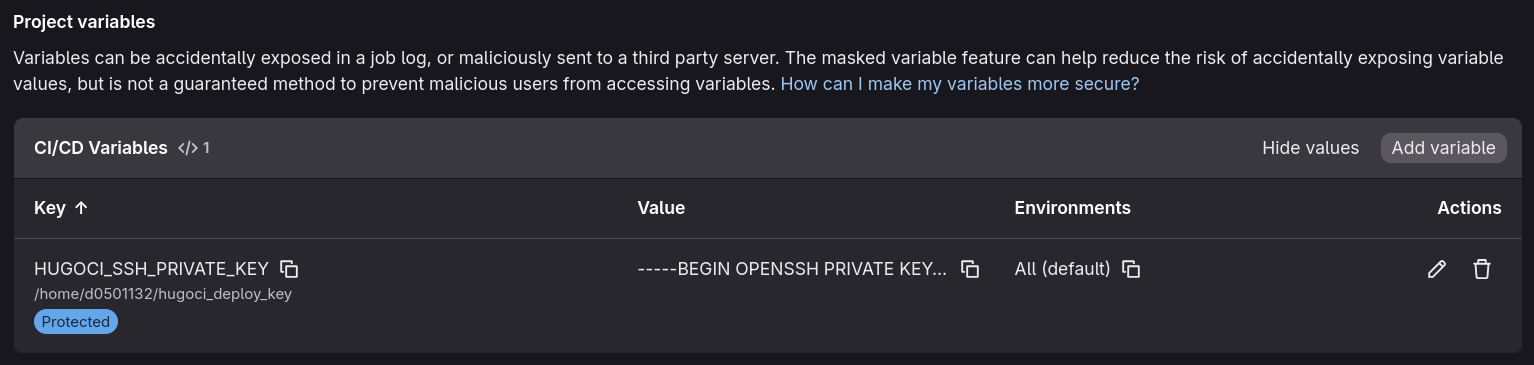
/usr/local/bin/hugo. HUGOCI_SSH_PRIVATE_KEYis configured in the project’s GitLab CI/CD variables. It contains the private key itself, since the script passes the variable contents tossh-add.
Keep the private key in GitLab’s CI/CD variables, not in the repository. Since the deploy job only runs on master, make sure the variable is available to that branch if it is configured as a protected variable.
Create the deployment account and SSH key #
Create a dedicated account on the Hugo server. Run these commands there as a user with sudo privileges:
sudo useradd -m -s /bin/bash hugoci
sudo mkdir -p /home/hugoci/.ssh
sudo chmod 700 /home/hugoci/.ssh
Generate a dedicated key pair on a trusted machine, not on the Hugo server. The private key will be stored in GitLab, and the public key will authorize the hugoci account:
ssh-keygen -t ed25519 -C "gitlab-hugo-deploy" -f "$HOME/.ssh/hugoci_deploy_key" -N ""
This creates ~/.ssh/hugoci_deploy_key (private) and ~/.ssh/hugoci_deploy_key.pub (public). The empty passphrase is needed for this non-interactive CI job; protect the private key by keeping it out of the repository and limiting access to the GitLab variable.
Display the public key:
cat "$HOME/.ssh/hugoci_deploy_key.pub"
As an administrator on the Hugo server, append the complete output as a single line in /home/hugoci/.ssh/authorized_keys. For example, open the file with:
sudo vim /home/hugoci/.ssh/authorized_keys
Then set ownership and permissions on the server:
sudo chown -R hugoci:hugoci /home/hugoci/.ssh
sudo chmod 700 /home/hugoci/.ssh
sudo chmod 600 /home/hugoci/.ssh/authorized_keys
Add the private key to GitLab #
In the GitLab project, open Settings > CI/CD > Variables, select Add variable, and create a variable with:
- Key:
HUGOCI_SSH_PRIVATE_KEY - Type: Variable (not File), because the pipeline passes the variable contents to
ssh-add - Value: the complete contents of
~/.ssh/hugoci_deploy_key, including theBEGINandENDlines - Protected: enable this if
masteris a protected branch; a protected variable is only made available to pipelines on protected refs
To display the private key so it can be copied into the value field:
cat "$HOME/.ssh/hugoci_deploy_key"
Copy the private key you created earlier (~/.ssh/hugoci_deploy_key) and paste its complete contents into the Value field for HUGOCI_SSH_PRIVATE_KEY.